Security
Self-Hosted Security: The 6-Layer Model
When you host AI services yourself, you are responsible for security. No cloud provider catches mistakes for you. Here are the 6 layers that protect your infrastructure.
Self-hosting means full control — but also full responsibility. Security is not a single feature but a layered model: 6 layers from physical infrastructure to monitoring. Each layer stops something different. None is sufficient on its own.
The 6 Security Layers
Each layer addresses a different attack surface. If Layer 1 fails, Layer 2 must hold. This is Defense in Depth.
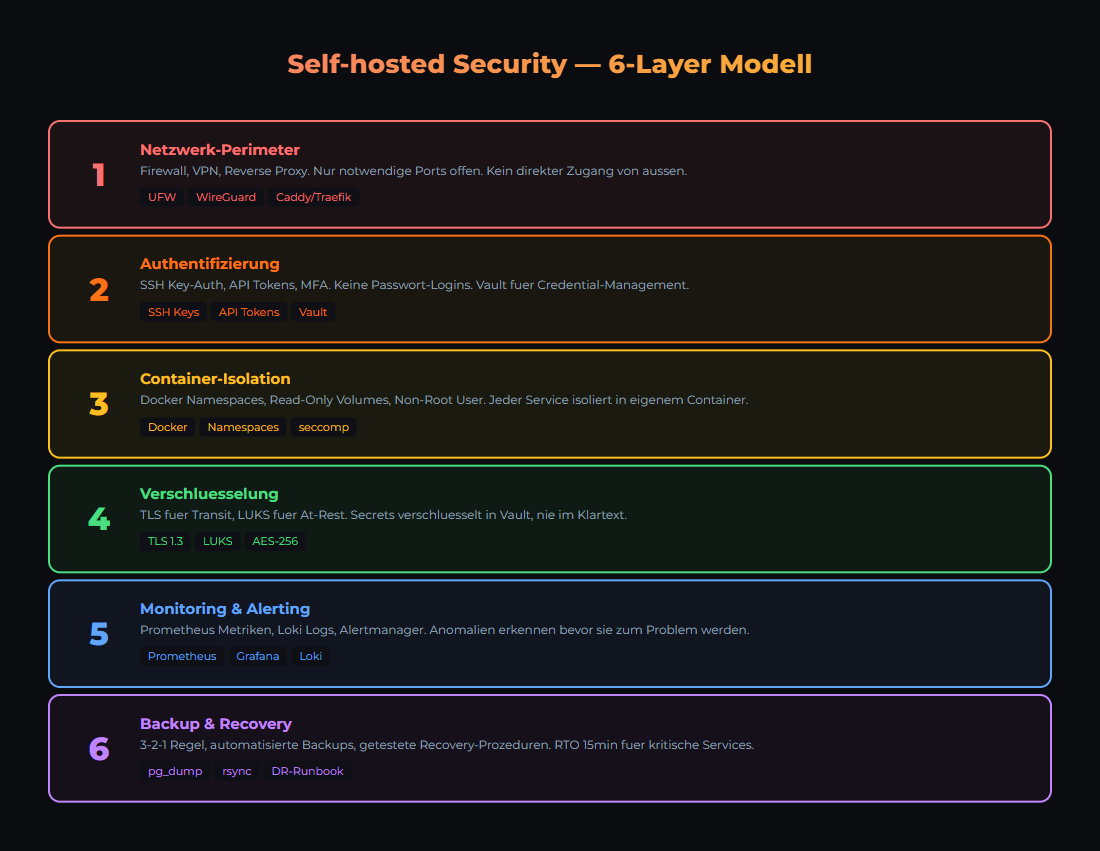
Security in layers: Each level protects against different attack vectors.
| Layer | Protects Against | Tools |
|---|---|---|
| 1. Network | Unauthorized external access | Firewall (UFW/iptables), VLAN, VPN |
| 2. SSH & Authentication | Brute force, weak passwords | SSH Key-Only, fail2ban, 2FA |
| 3. Host Operating System | Outdated software, kernel exploits | Unattended Upgrades, CIS Benchmark |
| 4. Containers & Services | Privilege escalation, unsecured APIs | Rootless containers, read-only FS, secrets |
| 5. Application | Prompt injection, data leakage | Input validation, output sanitizer, rate limits |
| 6. Monitoring & Response | Undetected intrusions | Loki, Grafana Alerts, audit logs |
Layer 1: Network Segmentation
Your local AI stack should NOT be directly reachable from the internet. The most important rule: Default Deny — everything is blocked, you only open what is needed.
UFW Basic Configuration
# Block everything (Default Deny)
sudo ufw default deny incoming
sudo ufw default allow outgoing

# Allow SSH (only from local network)
sudo ufw allow from 10.40.10.0/24 to any port 22

# Reverse Proxy (HTTPS)
sudo ufw allow 443/tcp

# Enable firewall
sudo ufw enable
sudo ufw status verboseServices like Ollama (11434), n8n (5678), Grafana (3000), PostgreSQL (5432) do NOT belong on the internet. If you need external access: VPN or reverse proxy with authentication (e.g., Cloudflare Tunnel or Traefik with BasicAuth).
Layer 2: SSH & Authentication
SSH is the main access point to your servers. Misconfigured, it becomes the biggest attack vector.
Hardening SSH (/etc/ssh/sshd_config)
# Disable password login
PasswordAuthentication no

# Prohibit root login (or key-only)
PermitRootLogin prohibit-password

# Allow specific users only
AllowUsers joe admin

# Idle timeout (5 minutes)
ClientAliveInterval 300
ClientAliveCountMax 0

# Restart: sudo systemctl restart sshd
Install fail2ban
# Installation
sudo apt install fail2ban

# Enable SSH jail
sudo cp /etc/fail2ban/jail.conf /etc/fail2ban/jail.local

# In jail.local:
# [sshd]
# enabled = true
# maxretry = 3
# bantime = 3600

sudo systemctl enable fail2ban
sudo systemctl start fail2ban

# Check status
sudo fail2ban-client status sshdIf you do not have SSH keys yet: ssh-keygen -t ed25519 -C "[email protected]". Copy the public key to the server: ssh-copy-id user@server. Then disable password login.
Layer 3 & 4: Host & Container Security
Host System
| Measure | Command / Configuration | Why |
|---|---|---|
| Auto-Updates | sudo apt install unattended-upgrades | Automatically apply security patches |
| Non-root User | sudo adduser deploy && sudo usermod -aG docker deploy | Minimal privileges, no permanent root |
| Kernel Updates | sudo apt upgrade linux-generic | Close kernel exploits |
| Unnecessary Services | sudo systemctl disable bluetooth cups | Reduce attack surface |
Container Security
| Principle | Implementation | Example |
|---|---|---|
| Read-Only Root | read_only: true in compose | Prevents filesystem manipulation |
| No Root in Container | user: '1000:1000' in compose | Container runs as normal user |
| Secrets Management | Docker Secrets or Vault | No credentials in environment variables |
| Resource Limits | mem_limit: 4g, cpus: '2.0' | Container cannot overwhelm the host |
| Network Isolation | Dedicated Docker networks per stack | Services only see what they need |
Many frameworks (FastAPI, Express) serve API documentation at /docs or /swagger automatically. In production: disable with docs_url=None. Attackers use these endpoints to map your API structure.
Layer 5: Application Security for AI
AI applications have unique security risks. LLMs can be manipulated (prompt injection) and leak sensitive data in their responses.
| Risk | Description | Countermeasure |
|---|---|---|
| Prompt Injection | User manipulates LLM instructions | System prompt isolation, input validation |
| Data Leakage | LLM outputs environment variables or secrets | Output Sanitizer (MANDATORY) |
| Token Theft | API keys intercepted | Vault, token rotation, rate limiting |
| Model Poisoning | Manipulated models from insecure sources | Only official sources (ollama.com, HuggingFace verified) |
| Resource Exhaustion | Excessively long prompts/contexts | Max token limits, request timeouts |
LLMs can be tricked into outputting environment variables, API keys, or system information. EVERY response must pass through a sanitizer that detects and removes patterns like API keys, IP addresses, and file paths. This is not a nice-to-have — it is mandatory for production.
Layer 6: Monitoring & Incident Response
Security without monitoring is blind. You need to know what happens on your systems — in real time.
| What to Monitor | Tool | Alert Condition |
|---|---|---|
| SSH Login Attempts | fail2ban + Grafana | More than 5 failed logins/hour |
| Container Health | Docker Health Checks + Uptime Kuma | Container unhealthy or stopped |
| Disk Usage | Prometheus Node Exporter | Disk > 85% full |
| API Errors | Loki Log Queries | HTTP 5xx rate > 1% of requests |
| Unexpected Processes | Audit Logs (auditd) | New process from unknown user |
Create a dedicated security dashboard with fail2ban bans, SSH logins, API error rates, and disk usage at a glance. You can see in 5 seconds if something is off. Our Grafana Monitoring Guide covers setting up security panels.
Das Wichtigste
- ✓Security is a layered model. 6 layers, each stops something different. None is sufficient alone.
- ✓Default Deny at the firewall. Only open what is needed. AI ports do NOT belong on the internet.
- ✓SSH Key-Only + fail2ban. No password login, automatic ban after 3 failed attempts.
- ✓Output Sanitizer is mandatory for AI applications. LLMs will leak secrets and system info otherwise.
- ✓Monitoring with alerting. Without monitoring, you will not know if someone is already inside.
Sources
- CIS Benchmarks — Industry standard for OS hardening
- Docker Security Documentation — Container security best practices
- OWASP Top 10 — Most common web application security risks
- fail2ban — Brute force protection for SSH and other services
Next step: move from knowledge to implementation
If you want more than theory: setups, workflows and templates from real operations for teams that want local, documented AI systems.
- Local and self-hosted by default
- Documented and auditable
- Built from our own runtime
- Made in Austria