Model Selection Guide
Choose the right AI model for your use case.
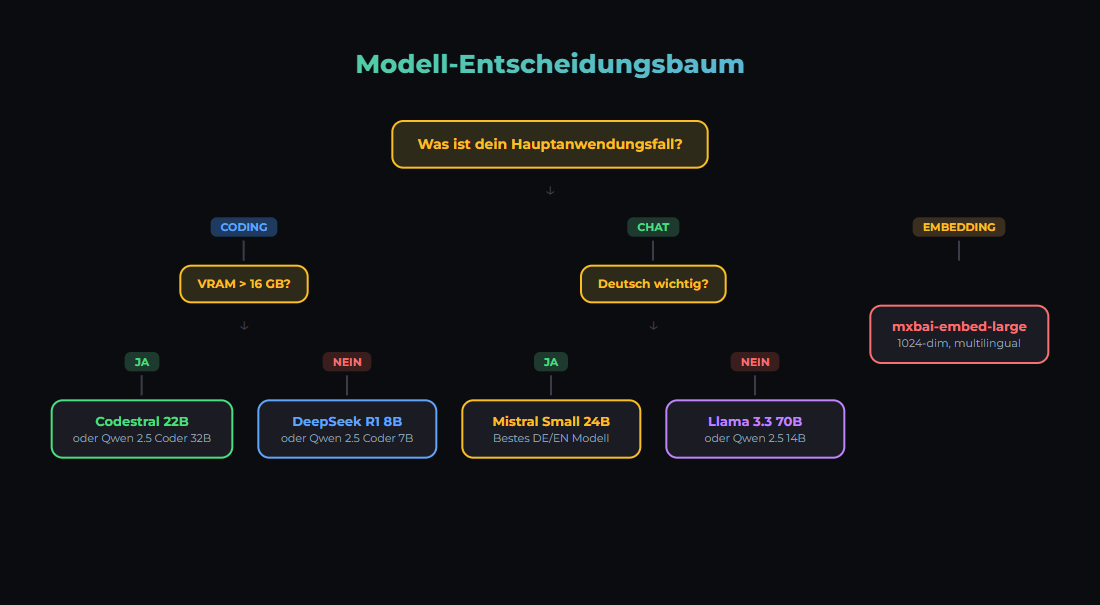
The Decision
Choosing the right model is the most important technical decision. Wrong model = bad results or unnecessary costs.
Model Categories
1. Small Models (1-3B Parameters)
- Examples: Llama 3.2 1B/3B, Gemma 2 2B, Phi-3.5 Mini
- Hardware: CPU is sufficient, 4-6GB RAM
- Latency: <100ms
- Use Cases: Embeddings, classification, simple Q&A
2. Medium Models (7-14B Parameters)
- Examples: Llama 3.3 8B, Qwen3 14B, Gemma 2 9B
- Hardware: 16GB RAM, GPU recommended (8-16GB VRAM)
- Speed: 43-112 tok/s on RTX 3090
- Use Cases: Chat, summarization, code generation, tool calling
3. Large Models (24B-34B Parameters)
- Examples: Mistral Small 3.1 (24B), Qwen 2.5 32B
- Hardware: 24GB VRAM (RTX 3090/4090)
- Speed: ~20-30 tok/s on RTX 3090
- Use Cases: Complex reasoning, long documents, highest local quality
- Note: 70B models do NOT fit on 24 GB VRAM — require 48 GB+ or multi-GPU
4. Top Open Source (S-Tier, March 2026)
- GLM-5 (Z AI): Reasoning specialist, GPQA Diamond 86%, HumanEval 90%, SWE-bench 77.8%
- Kimi K2.5 (Moonshot AI): HumanEval 99%, AIME 96.1%, SWE-bench 76.8% — S-Tier
- MiniMax M2.5: S-Tier in Artificial Analysis Leaderboard
- Qwen 3.5 Plus: MMLU 88.4%, ~1/13 the cost of Claude Sonnet
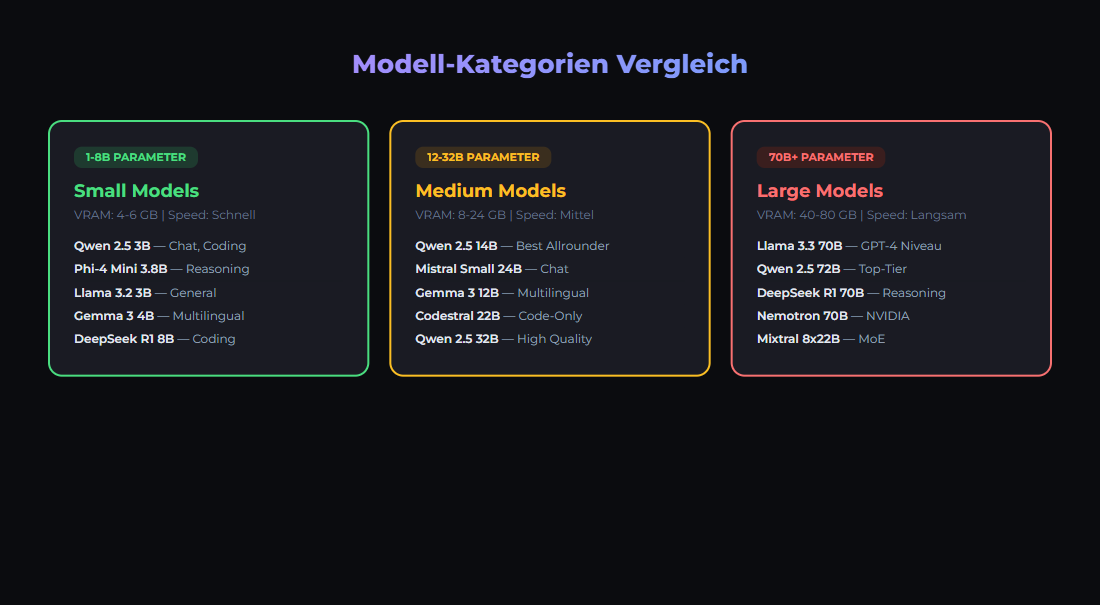
Comparison Table (as of March 2026)
| Model | Parameters | VRAM (Q4) | tok/s (RTX 3090) | Strength |
|---|---|---|---|---|
| Gemma 2 2B | 2B | ~2 GB | 200+ | Embeddings, classification |
| Llama 3.3 8B | 8B | ~5 GB | ~112 | All-rounder, fast |
| Qwen3 14B | 14B | ~10 GB | 43.2 | German, multilingual |
| Mistral Small 3.1 | 24B | ~16 GB | ~30 | German (outperforms GPT-4o Mini) |
| Qwen 2.5 32B | 32B | ~20 GB | ~20 | Coding, reasoning |
| Llama 3.3 70B | 70B | ~40 GB | Needs 48 GB+ | MMLU 86%, HumanEval 88.4% |
German Tip: Mistral Small 3.1 (24B) outperforms GPT-4o Mini and Gemma 3 for European languages — ideal for German-language chat and content tasks on local hardware.
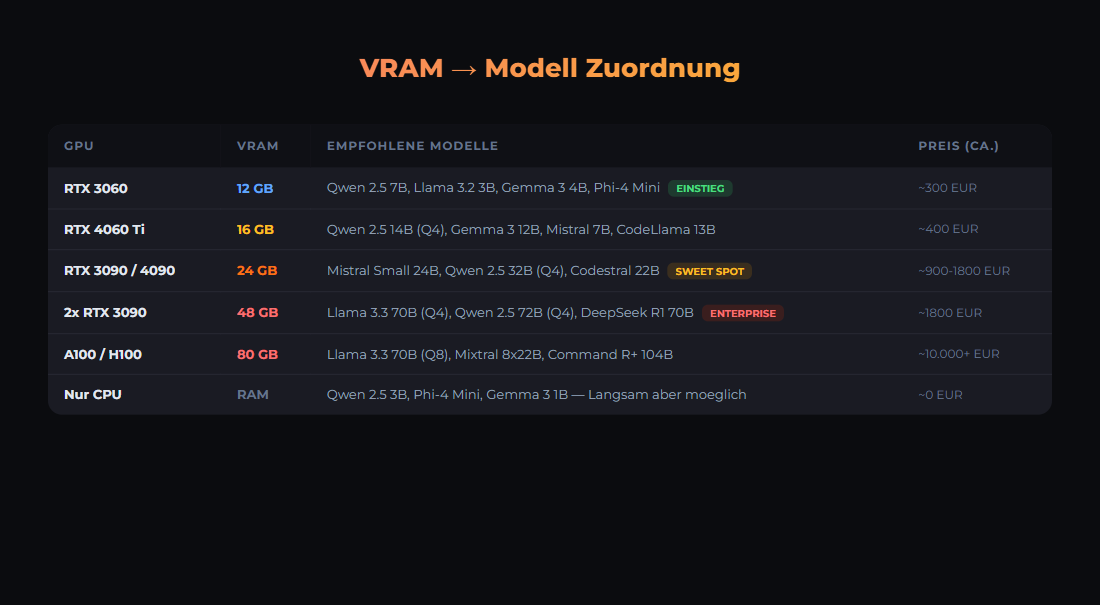
Hardware Requirements with Ollama
Here is what you need to run the models locally:
# Load and test Ollama models
ollama pull llama3.2

# List models
ollama list

# Chat with a model
ollama run llama3.2 "Hello, who are you?"

# Hardware check
ollama run llama3.2 "How much RAM did you use?"
Typical RAM usage with Ollama:
# VRAM usage (approx., Q4 quantized)
gemma2:2b           ~2GB VRAM   → 200+ tok/s
llama3.3:8b         ~5GB VRAM   → ~112 tok/s
qwen3:14b          ~10GB VRAM   → 43 tok/s
mistral-small3.1:24b ~16GB VRAM  → ~30 tok/s
qwen2.5:32b        ~20GB VRAM   → ~20 tok/s
llama3.3:70b       ~40GB VRAM   → DOES NOT FIT on 24GB GPU!

# RTX 3090 (24 GB): Maximum is about 34B (Q4_K_M)
# 70B needs 48 GB+ (2x RTX 3090 or RTX 6000 Ada)

# Save with quantized models
ollama pull llama3.3:q4_K_M   # 4-bit quantization, ~5GB
ollama pull qwen3:14b         # 4-bit default, ~10GB
Decision Guide
- Budget-friendly? Llama 3.3 8B or Qwen 2.5 7B (~112 tok/s on RTX 3090)
- Maximum local quality? Mistral Small 3.1 24B or Qwen 2.5 32B (fits on 24 GB)
- Fast embeddings? mxbai-embed-large (1024 dim)
- German language? Mistral Small 3.1 (outperforms GPT-4o Mini) or Qwen3 14B
- Absolute best quality? Cloud API: Claude Sonnet 4.5, GPT-4o, or Gemini 2.5 Pro
- Open Source S-Tier? GLM-5, Kimi K2.5, MiniMax M2.5 (need large GPU or cloud hosting)
Our Stack
# We use (as of March 2026):
# - mistral-small3.2:24b on RTX 3090 (.90) for chat/code (strong in German)
# - mxbai-embed-large on RTX 2060 (.99) for embeddings (1024 dim)
# - Cloud API (Claude Sonnet 4.5) for complex reasoning

# docker-compose.yml excerpt
services:
  ollama:
    image: ollama/ollama:latest
    volumes:
      - ollama_data:/root/.ollama
    deploy:
      resources:
        reservations:
          devices:
            - driver: nvidia
              count: 1
              capabilities: [gpu]

# Environment Variables
OLLAMA_HOST=0.0.0.0:11434
OLLAMA_MODELS=/root/.ollama/models
Sources
- Artificial Analysis LLM Leaderboard, March 2026 — Intelligence Index, 312 models, updates every 72h
- Onyx Open LLM Leaderboard — Kimi K2.5 HumanEval 99%, AIME 96.1%
- Vellum: Llama 3.3 70B vs GPT-4o — MMLU, HumanEval, IFEval benchmarks
- Mistral AI: Mistral Small 3.1 — Outperforms GPT-4o Mini for European languages
- LocalAIMaster: Best GPUs for AI — RTX 3090 tok/s measurements
- CoreLab: LLM GPU Benchmarks — 8B ~112 tok/s on RTX 3090
- IntuitionLabs: 24GB GPU Optimization — Max ~34B on 24 GB VRAM
- Ollama Model Library — Available models and quantizations
- LMSYS Chatbot Arena — Community-based model ranking
War dieser Artikel hilfreich?
Next step: ship workflows that stay operable
Use proven n8n patterns, templates and integrations for workflows that stay local, documented, and auditable.
Why AI Engineering
- Local and self-hosted by default
- Documented and auditable
- Built from our own runtime
- Made in Austria
Not legal advice.